|
 |
| Click to play | Make your own Smilebox |
Monday, July 30, 2007


Saturday, July 07, 2007
Official Google Blog: Get in sync
Official Google Blog: Get in sync
If you are using multiple computers, operating systems and live within a browser this really can make your life easy. This extension has made me to transit to Linux very easy.
Google Browser Sync provides more than just a simple method of syncing bookmarks. It syncs all your Firefox data -- bookmarks, cookies, passwords, history, tabs, and windows. So, not only are your bookmarks kept in sync, but you can even close a Firefox session with tabs and windows open, and reopen the same session on another PC.
Syncing occurs automatically, and data is stored on Google's servers, which makes it available even when individual clients are switched off. To use Google Browser Sync, you must have a Google account. If you already use Gmail, Google Talk, or any other Google service, you already have one. If not, it is a simple matter to create one at the Google Account page.
Because it's a Firefox extension, Google Browser Sync runs inside the Firefox code, and is totally operating-system-independent. Wherever Firefox runs, so does the extension.
Installing a Firefox extension is simple; easy-to-follow instructions are provided on the extension's Web page
If you are using multiple computers, operating systems and live within a browser this really can make your life easy. This extension has made me to transit to Linux very easy.
Google Browser Sync provides more than just a simple method of syncing bookmarks. It syncs all your Firefox data -- bookmarks, cookies, passwords, history, tabs, and windows. So, not only are your bookmarks kept in sync, but you can even close a Firefox session with tabs and windows open, and reopen the same session on another PC.
Syncing occurs automatically, and data is stored on Google's servers, which makes it available even when individual clients are switched off. To use Google Browser Sync, you must have a Google account. If you already use Gmail, Google Talk, or any other Google service, you already have one. If not, it is a simple matter to create one at the Google Account page.
Because it's a Firefox extension, Google Browser Sync runs inside the Firefox code, and is totally operating-system-independent. Wherever Firefox runs, so does the extension.
Installing a Firefox extension is simple; easy-to-follow instructions are provided on the extension's Web page
Sunday, May 13, 2007
Mastering Ubuntu
Today we have successfully installed Ubuntu 6.06 (linux) on all our systems and started training our staff. It is running pretty fast and low on resources. So far I heard stories about Linux and its variants but this is first time seeing it with my own eyes that too in our Lab. We may be soon trying Server edition of Ubuntu.
Powered by ScribeFire.
Sunday, September 24, 2006
What Happened to my blog ?
In August I have downloaded Windows Live Writer and posted a single post. Immediatley I have received some error messages to my email account which I cant understand. Immediately I couldnot see the blogs online. I could post them, edit them, almost everything except viewing them online. I even went to see them in Dashboard on Blogger, changed settings, still problem is same. What happened to my all blogs. So far I never posted any objectionable content. Only thing is I used Qumana and inserted some ads. Google dont object any ads as it itself enables to display banners and advertisements and pays commission.
Monday, August 14, 2006
Writer Live from Microsoft
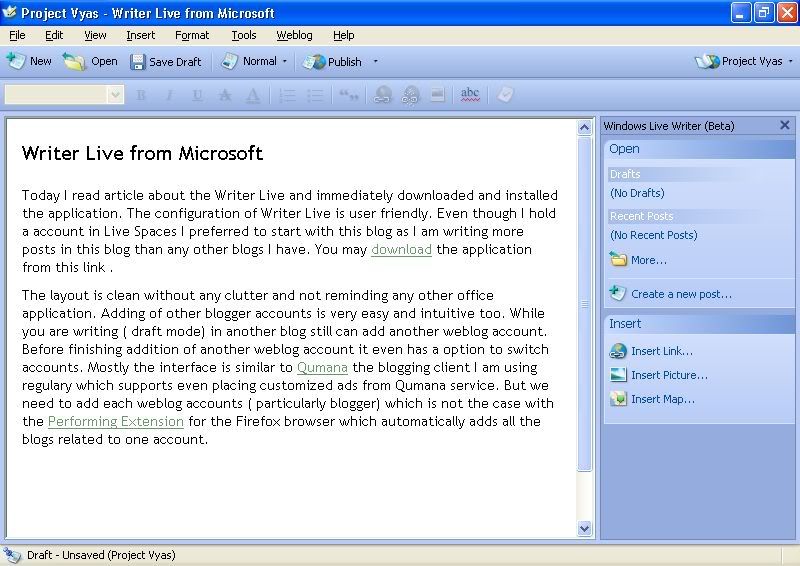
Today I read article about the Writer Live and immediately downloaded and installed the application. The configuration of Writer Live is user friendly. Even though I hold a account in Live Spaces I preferred to start with this blog as I am writing more posts in this blog than any other blogs I have. You may download the application from this link .
The layout is clean without any clutter and not reminding any other office application. Adding of other blogger accounts is very easy and intuitive too. While you are writing ( draft mode) in another blog still can add another weblog account. Before finishing addition of another weblog account it even has a option to switch accounts. Mostly the interface is similar to Qumana the blogging client I am using regulary which supports even placing customized ads from Qumana service. But we need to add each weblog accounts ( particularly blogger) which is not the case with the Performing Extension for the Firefox browser which automatically adds all the blogs related to one account. You can see the application image I captured here.

Friday, May 05, 2006
Beware How You Google
A simple misspelling of Google's domain name could lead to a Web surfer's worst nightmare. In a new twist to the old practice of "typosquatting," virus writers have registered a slight variation of Google Inc.'s popular search-engine site to take advantage of any users who botch the spelling of the google.com URL.
read more | digg story
read more | digg story
Thursday, March 23, 2006
Your Attorney in India
the World's First Portal dedicated to Indian Laws and Judicial System; This completely Non-Commercial Portal is brought to you by Vakilbabu Law House Ltd., the Incorporated Law Firm, a group of ethically inclined and socially conscious Advocates [also known as Lawyers or Attorneys] from India, led by Advocate Mr. Satish G. Maheshwari.
technorati tags: attorney, legal-advice, indianlaw, indian-law
Subscribe to:
Posts (Atom)